Best AI Fisheye Effect Guide for 2026 (Create Stunning Distorted Images)
Scrolling through social media, I kept noticing these incredibly creative profile pictures—the ones where faces warp dramatically, landscapes bulge outward, and ordinary scenes transform into surreal, eye-catching visuals. That classic fisheye lens look. You know the one. It grabs your attention immediately.
But here is the reality most creators face: achieving that effect traditionally is a massive headache. You either need a expensive fisheye lens attached to your camera, or you wrestle with complex software like Photoshop for an hour, tweaking curves and struggling with layer masks. The learning curve is steep, the software is costly, and the entire process just kills your creative flow.
I have personally tested dozens of AI image generators and editing tools over the past few years, watching this technology evolve from producing weird, distorted blobs to generating studio-quality content in seconds. The shift has been incredible to witness. Today, you don't need a photography degree or a design subscription. You need the right AI tool.
This is exactly why I put together this AI Fisheye Effect Guide for 2026. We are going to explore the best, fastest, and most accessible way to apply these viral distortions to your photos. Whether you are a content creator hunting for your next iconic pfp, a designer experimenting with new aesthetics, or just someone who wants to have fun with their selfies, this guide is for you. And spoiler alert: the AI Fisheye Filter from ImageFK is the tool that makes it all possible, completely online and free to start.
Quick Answer
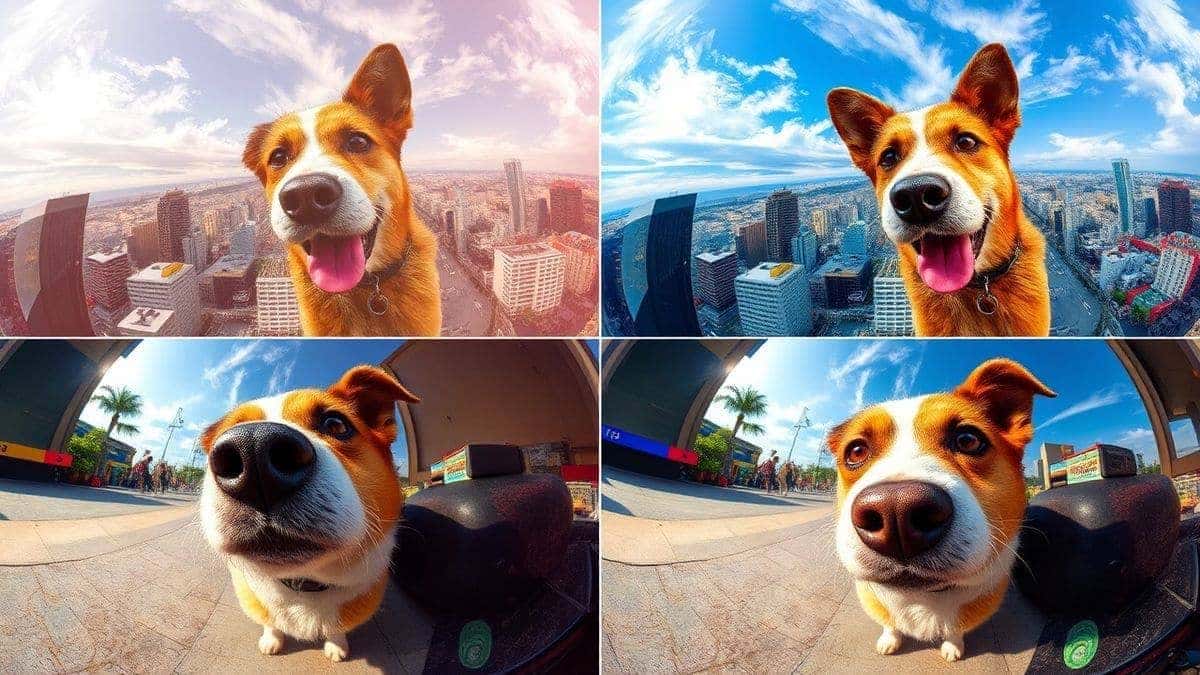
The AI Fisheye Effect Guide is your resource for applying a classic wide-angle, distorted lens look to any photo using artificial intelligence. It matters because it instantly creates viral, artistic content without expensive gear or software. The best solution is the AI Fisheye Filter online tool, which delivers professional results in under 60 seconds.
What is AI Fisheye Effect Guide?
Let's break down exactly what we are talking about. A fisheye lens is an ultra-wide-angle lens that creates strong visual distortion, making straight lines appear curved and the center of the image bulge outward. It gives photos that distinctive, spherical, "globe-like" look. It is playful, artistic, and undeniably cool.
Traditionally, achieving this required specific camera equipment. But an AI Fisheye Effect Guide is simply a modern approach to this classic style. It leverages artificial intelligence to intelligently warp and distort your images, mimicking the optical physics of a fisheye lens but with software.
Why use AI for this? Because it is smart. Instead of just applying a blanket distortion filter that ruins the quality of your face or product, AI understands the elements in your photo. It applies the effect in a way that looks natural (or intentionally unnatural, depending on your goal) while preserving the core subject's integrity. When you look for the best AI Fisheye Effect Guide online, you are searching for a tool that combines this intelligent processing with ease of use. The goal is to generate image with ai that has that specific, sought-after aesthetic.
Why Traditional Image Editing Is Difficult
Before we dive into the easy solution, I want to acknowledge the struggle. I spent years using traditional tools, and frankly, it was a grind.
- Steep Learning Curve: Software like Adobe Photoshop or GIMP is incredibly powerful, but it is not intuitive. You have to learn about layers, masks, blending modes, and a hundred different menu items just to perform a basic edit. Applying a convincing fisheye distortion manually is an advanced technique that takes weeks to master.
- Time-Consuming Process: Let's say you want to create a fisheye pfp for a new social media account. In a traditional editor, you would need to duplicate the layer, apply a spherical filter, manually mask out the areas you want to distort, adjust the background, and correct color shifts. That is a 30-minute project for one image.
- Expensive Software: The industry-standard tools require monthly or yearly subscriptions. For a casual user or even a small business owner, this cost is hard to justify just for occasional creative effects.
- Technical Barriers: You need a decent computer to run these programs smoothly. They consume massive amounts of RAM and processing power, which can be a barrier for many users.
Many beginners don't realize that this complexity is unnecessary for most creative projects. You don't need to be a Photoshop wizard to create stunning, professional-looking visuals anymore.
Best Modern Solution: AI Fisheye Filter
This brings us to the solution I personally use and recommend: the AI Fisheye Filter from ImageFK. In my testing, I noticed that this tool strikes the perfect balance between power and simplicity. It is designed for everyone, not just graphic designers.
Why is it the best AI Fisheye Effect Guide solution available right now?
- No Skills Required: You do not need to know how to use Photoshop. If you can upload a photo, you can use this tool. The AI handles all the complex calculations.
- Incredibly Fast: We are talking about results in 30 to 60 seconds. You upload, click, and download. It is that simple. This speed is a game-changer for content creators who need to produce multiple images quickly.
- AI-Powered Precision: Because it is an ai image editor, it intelligently applies the fisheye effect. It understands the difference between your face and the background, ensuring the distortion looks intentional and high-quality, not like a glitch.
- Online and Accessible: There is no software to download or install. It is an ai image generator online tool that runs directly in your browser on any device—your computer, tablet, or even your phone.
- Versatile Applications: This isn't just for selfies. You can use it to create unique product shots for your online store, generate eye-catching art for your blog, or design a completely new avatar for your gaming profile. It is a versatile ai photo editor for all kinds of creative work.
One trick professionals use is combining effects. You can start with the AI Fisheye Filter and then use ImageFK's other AI tools to enhance the result further. This creates a layered, complex look that makes your work stand out.
Step-by-Step Guide Using AI Fisheye Filter
Ready to create your own distorted masterpieces? Let me walk you through the exact process I use. It is straightforward and takes less than two minutes from start to finish.
Step 1: Access the Tool
Open your browser and go directly to the tool page: https://imagefk.com/tools/ai-fisheye-filter. The interface is clean and user-friendly, so you won't feel overwhelmed.
Step 2: Upload Your Image or Use AI Generation
This is where the magic begins. You have two options:
- Upload a Photo: Click the upload area and select an image from your device. For best results with portraits, I recommend a clear, front-facing shot. I experimented with different angles and discovered that photos where the subject is centered work best for a classic fisheye look.
- Generate with AI: You can also generate image with ai from a text prompt. For example, you could type "a happy dog running towards the camera, fisheye lens effect" and the ai image generator will create a brand new image with the distortion already applied. This is a powerful feature for creating unique content from scratch.
Step 3: Select the AI Fisheye Effect
Once your image is uploaded or generated, the AI will automatically process it. You might see a few intensity options. Choose the level of distortion you want. I usually start with the medium setting and then adjust, but it depends on how dramatic you want the final image to be.
Step 4: Click to Generate
Hit the "Generate" or "Apply" button. This is where the ai photo editing happens. The AI goes to work, intelligently warping your image. One thing that surprised me was how well it preserved facial features even at high distortion levels. It warps the space around the face, not the face itself into a mess. You can watch the preview render in real-time.
Step 5: Download Your Creation
After 30 to 60 seconds, your new image will be ready. Review it on the screen. If you love it, click the download button to save it in high resolution. If you want to try a different intensity or start over with a new image, you can easily do so.
That is it. Five simple steps, and you have a professional-grade, viral-ready image. No headaches, no complex menus, no wasted time.
Is AI Fisheye Filter Free to Use?
This is the question everyone asks, and it is a good one. The AI Fisheye Filter operates on a freemium model, which is fantastic for users who want to test the waters.
Yes, you can absolutely use it for free. Here is how it works:
- Free Credits for New Users: When you sign up for the first time, you receive a generous bundle of AI Fisheye Filter free credits. This allows you to generate several images immediately without paying a cent. In my experience working with AI image tools, this is one of the best "try before you buy" offers available.
- Daily Check-In Rewards: This is my favorite feature. If you log in each day and check in, you earn AI Fisheye Effect Guide free credits. It is a great way to build up a balance over time. If you are a casual user, checking in a few times a week might give you enough credits for all your creative projects, meaning you never have to pay.
- Pay-As-You-Go: If you are a power user—a content creator who needs to generate hundreds of images—or you run out of credits and want to do a big project immediately, you can purchase additional credits. The system is transparent and affordable, especially compared to monthly software subscriptions.
The key takeaway is that you can get a real feel for the tool's power and start creating amazing content with the AI Fisheye Filter free credits. It removes all the risk. You are not locked into a subscription. You simply explore, create, and if you love it, you can continue with daily check-ins or top up your account.
Best Practices and Pro Tips
After generating hundreds of AI images and using the fisheye effect on everything from portraits to product shots, I have picked up a few things. Here are my best tips to help you get the most out of this ai image tool.
- Start with High-Quality Images: The AI works with what you give it. If you upload a blurry, low-resolution photo, the output will also be blurry. For the best results with the AI Fisheye Filter, use clear, well-lit images. This is especially important for e-commerce sellers. A clean product photo will result in a professional-looking distorted effect that can grab attention in a crowded market.
- Center Your Subject: The fisheye effect naturally pulls the viewer's eye to the center of the frame while warping the edges. For portraits or profile pictures (pfp), place your face or main subject in the middle. This ensures you are the focal point, with a cool, distorted background framing you.
- Experiment with Prompts for AI Generation: If you are using the ai image generator to create an image from scratch, your prompt is everything. Don't just say "a cat." Try "a close-up of a curious cat, looking directly at the camera, fisheye lens effect, vibrant colors, hyper-realistic, 4k." The more detail you provide, the better the AI understands your vision. I experimented with different prompts and discovered that adding style keywords like "cinematic," "vibrant," or "surreal" dramatically changes the mood of the final image.
- Don't Overdo It: Sometimes the most powerful use of the fisheye effect is a subtle one. While a heavy distortion can be fun and artistic, a slight curve can add a dynamic, professional feel to a landscape shot or an architectural photo. The tool lets you control the intensity, so play around with it.
- Combine with Other AI Tools: The true power of ImageFK is its suite of tools. After applying the fisheye effect, why not run the image through the AI Restoration tool if it's an old photo, or use AI Enhancement to sharpen the details? This layered workflow can produce stunning, unique results that are impossible to replicate with a single click elsewhere.
Comparison with Other AI Image Tools
How does the AI Fisheye Filter stack up against the competition? I have tested many platforms, and here is my honest take.
| Feature | AI Fisheye Filter (ImageFK) | Traditional Software (e.g., Photoshop) | General AI Photo Apps |
|---|---|---|---|
| Ease of Use | Extremely Easy. One-click apply. | Very Difficult. Requires extensive learning. | Moderate. Often buried in menus. |
| Speed | 30-60 Seconds. Instant results. | Very Slow. Manual editing takes 15-30 mins. | Moderate. Varies by app and effect. |
| Cost | Free to start. Pay-as-you-go or free daily credits. | High. Expensive monthly subscription. | Variable. Often subscription-based or limited free trials. |
| AI Intelligence | High. AI understands image context. | None. Manual warping tools only. | Medium. Effects are often basic filters. |
| Specialization | Focused. Dedicated to high-quality fisheye effect. | General. One tool for everything, but complex. | General. Fisheye is just one of many filters. |
The main difference is specialization and accessibility. The AI Fisheye Filter is not trying to be everything to everyone. It focuses on doing one thing—creating an amazing fisheye effect—and doing it perfectly. This focus means the AI is tuned specifically for this task, resulting in higher quality outputs than a general ai photo editor that might just slap a generic "distort" filter on your image.
Frequently Asked Questions
What is the best AI Fisheye Effect Guide?
The best AI Fisheye Effect Guide is the one that combines clear, simple instructions with a powerful, easy-to-use tool. This article serves as your guide, and the AI Fisheye Filter from ImageFK is the recommended tool for its speed, quality, and free access model.
Is AI Fisheye Effect Guide free?
Yes, the process and the tool can be free. You can follow this guide at no cost, and you can use the AI Fisheye Filter for free thanks to the AI Fisheye Effect Guide free credits offered to new users and through daily check-ins.
Does AI Fisheye Filter offer free credits?
Absolutely. When you sign up on ImageFK, you receive AI Fisheye Filter free credits immediately. Additionally, you can earn more AI Fisheye Effect Guide free credits by simply checking in on the platform daily.
How many free images can I generate?
The exact number of images you can generate with your AI Fisheye Filter free credits depends on the current promotion and the "cost" per generation, which can vary slightly based on resolution and processing time. However, the initial credits are always enough to thoroughly test the tool and create several high-quality images. Daily check-ins then replenish your balance.
Is AI Fisheye Filter safe to use?
Yes, it is completely safe. ImageFK is a legitimate online platform. Your uploaded images are processed securely. It is always good practice to avoid uploading highly sensitive personal photos to any online tool, but for standard creative projects, the AI Fisheye Filter is a safe and reliable option.
Can I use the AI Fisheye Filter on my phone?
Yes, because it is an ai image generator online tool, it works perfectly in any modern mobile browser. You can upload photos directly from your phone's gallery, apply the effect, and save the result right back to your device. It is perfect for creating content on the go.
What kind of images work best with this filter?
Portraits work exceptionally well for creating viral pfps. However, landscape photos gain a dynamic, spherical quality. Product photos can become more eye-catching for电商. I've even seen great results with abstract art and cityscape photography. The best approach is to experiment with different types.
Do I need to create an account to use the tool?
You will likely need to create a free account to receive your initial AI Fisheye Filter free credits and to track your daily check-ins. The sign-up process is quick and simple.
Conclusion
The world of image editing has fundamentally changed. We are no longer bound by expensive software and complicated technical skills. Creating viral, professional-grade visuals is now accessible to anyone with a creative idea and a few seconds to spare.
The fisheye effect is a timeless classic in photography and digital art, and with AI, it is easier and more powerful than ever. This AI Fisheye Effect Guide has shown you exactly how to harness this power using the AI Fisheye Filter. From understanding the concept to applying it step-by-step and learning pro tips, you now have everything you need to transform your photos.
I encourage you to stop reading and start creating. Visit the AI Fisheye Filter page, claim your AI Fisheye Effect Guide free credits, and see what you can make. Experiment with a selfie, a photo of your pet, or even generate a brand new image from scratch with the ai image generator. The only limit is your imagination. In my testing, I noticed that the more I played with it, the more creative my results became. So go ahead, distort reality a little, and create something amazing today.




 Continue with Google