
Love Time
Cinematic close-up portrait - I will hold my girlfriend's hands together in front of me, press them against the wall above her head, and give her a romantic fac...
Edit photos using simple text prompts. Upload an image, describe the edit, remove objects, replace backgrounds, or enhance portraits in seconds.

Explore a curated AI prompt library featuring powerful Nano Banana prompts and creative templates. Discover inspiration, customize prompts, and improve your AI-generated images, content, and productivity.
Cinematic close-up portrait - I will hold my girlfriend's hands together in front of me, press them against the wall above her head, and give her a romantic fac...

Create a professional black and white portrait of a man (perfectly matching the attached reference image, without any Al beautification, enhancements, or modifi...

Generate a bold fashion image of a female model wearing a neutral-toned structured dress with flowing elements. Pose her confidently in a spacious zoo environme...

gerar imagem mais próximo com zoom, homem numa praia ao entardecer, sorrindo, vestindo linho cru, da cintura para cima, na mão direita uma taça de vinho branco...

A realistic portrait of a man standing on the rooftop of a tall building at sunset, holding a book “Death Note” notebook confidently in one hand. He has a serio...
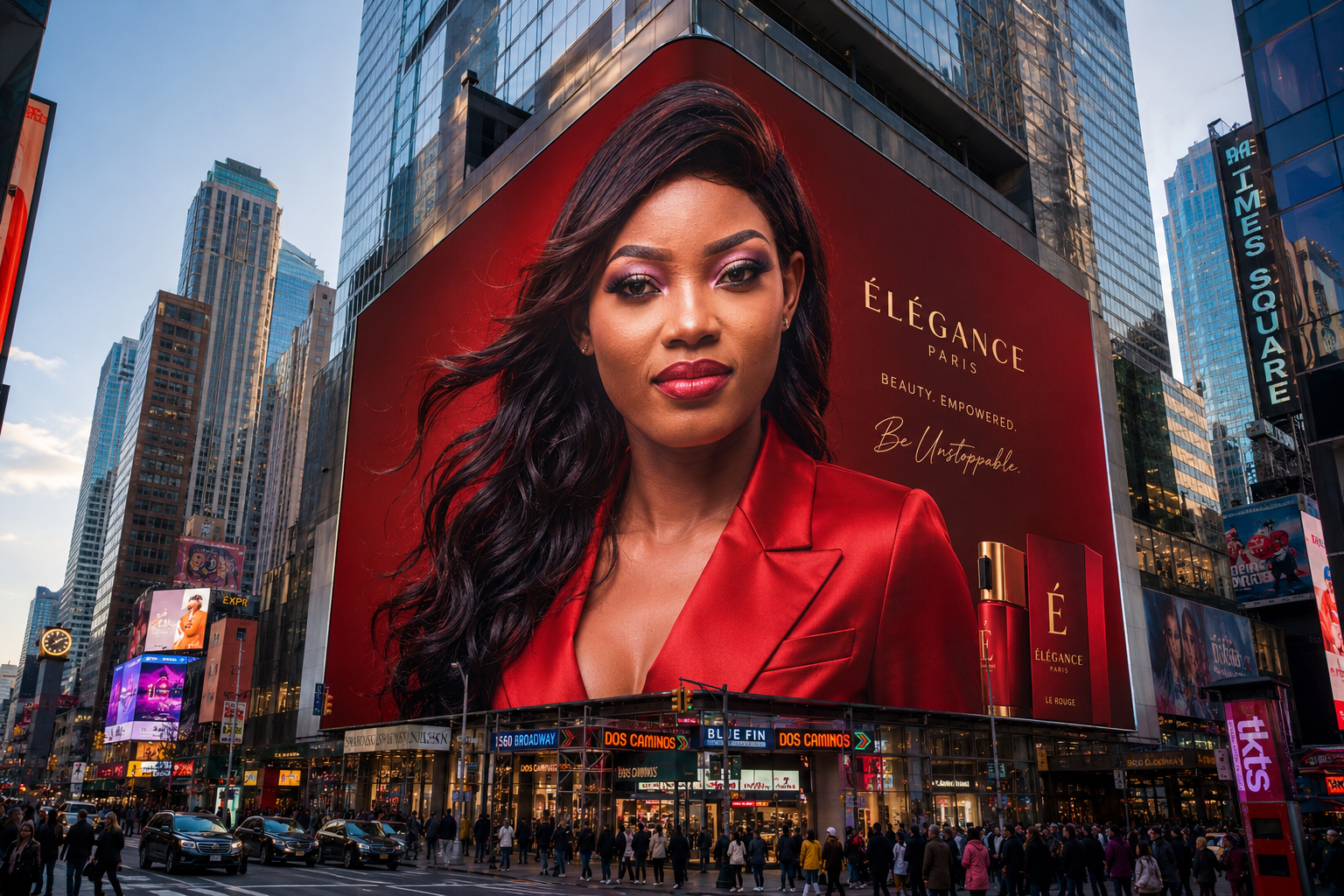
Using the provided reference image, create an ultra-realistic mega-scale luxury beauty advertising campaign displayed on a massive 3D digital billboard wrapped...
Well-crafted prompts are the key to unlocking stunning AI-generated images. Our curated prompt library saves you hours of experimentation and helps you achieve professional results instantly.
Skip the trial and error. Start with proven prompts that work and customize them for your needs.
Expert-crafted prompts produce higher quality, more consistent AI image outputs.
Study professional prompts to understand prompt engineering techniques and improve your skills.
Discover new styles, techniques, and creative possibilities with our diverse prompt collection.
Real examples created using simple text prompts.
Prompt: remove the person standing behind the subject.
Prompt: change the background to a tropical sunset beach.
Prompt: convert this image into anime illustration style.
Prompt: improve lighting and create a professional portrait look.
Explore core editing capabilities — each tool has a dedicated page with examples and prompts.
Remove people, logos, wires, or clutter from any photo using simple text prompts. The AI object remover analyzes context and fills the cleared area naturally — no manual clone stamp required. Perfect for travel shots, real estate listings, and product photography where distractions hurt conversion. Works alongside our free AI photo editor online for multi-step workflows: remove objects first, then upscale or change the background.
Try AI Object RemoverCreate clean cutouts and transparent backgrounds for Amazon, Shopify, and social storefronts. The AI background remover detects edges on hair, fur, and glass with high accuracy. Replace backgrounds with studio white, lifestyle scenes, or seasonal themes using a follow-up prompt. E-commerce sellers save hours compared to manual Photoshop masking while keeping catalog images consistent across hundreds of SKUs.
Try AI Background RemoverExtend image borders, fill missing regions, or widen compositions for Instagram, ads, and banners. AI generative fill understands lighting, perspective, and texture so expanded areas blend seamlessly. Use it when a crop is too tight, when you need a wider landscape, or when replacing a section with new content. Pair with our image extender for outpainting-style edits without leaving the browser.
Try AI Image ExtenderTurn low-resolution phone photos into sharp 4K assets for print, ads, and large displays. The AI photo upscaler enhances detail, reduces compression artifacts, and preserves natural skin tones. Ideal when client assets arrive too small, when legacy images need a quality boost, or when marketplace guidelines require minimum pixel dimensions. Choose higher resolution output in the generator for maximum clarity.
Try AI Photo UpscalerConvert portraits and scenes into anime, oil painting, watercolor, sketch, or cinematic looks with AI style transfer. Describe the target aesthetic in your prompt or browse our prompt library for proven templates. Content creators use style transfer for avatars, branded illustrations, and social posts that stand out. Unlike generic filters, text-based style transfer adapts to each photo's composition and lighting.
Try AI Style TransferKeep the same face, outfit, and art style when generating new poses, scenes, or story panels. Character consistency editing helps comic creators, brand mascots, and campaign series maintain visual identity across dozens of images. Upload a reference photo and describe the new scene — the AI preserves recognizable features while changing background, action, or mood. Essential for multi-image fusion workflows.
Try Character Consistency EditorUploaded images are processed securely and removed from servers after a short retention window. No public gallery without your consent.
Free trial edits may include limits; paid credit packs deliver clean, watermark-free downloads ready for client delivery.
Use edited images for marketing, e-commerce, and client projects when you purchase credits — no separate license fee.
Edit photos in Chrome, Safari, or Firefox on desktop, tablet, or phone. No app install required.
Explore more: Nano Banana Prompt Library · AI Comic Creator
Export edited photos at 1K, 2K, or 4K resolution depending on your model and credit plan. Use Single Edit for one-shot changes like background removal or object cleanup. Switch to Multi Fusion when you need to combine multiple reference images — ideal for character consistency, product mockups, and complex creative prompts. Our free AI photo editor online works on desktop and mobile browsers without installing software.
Describe what you want to change and AI edits the image automatically.
Generate edited images within seconds using optimized AI models.
Generate square, portrait or landscape images.
Choose between fast generation or maximum quality.
Upload a photo from your device.
Explain what you want to change.
AI edits the image instantly.
Photographers, e-commerce sellers, designers, and content creators use ImageFK to edit photos faster — without learning Photoshop.
Professional photo editing without Photoshop skills. Remove objects, enhance portraits, and create stunning visuals in seconds using AI-powered tools.
Create professional product images for your online store. Change backgrounds, remove distractions, and generate high-converting product photos.
Speed up your workflow with AI assistance. Generate multiple variations, experiment with styles, and deliver projects faster to clients.
Create eye-catching visuals for social media, blogs, and marketing campaigns. No design experience needed - just describe what you want.
| Feature | AI Image Editor | Traditional Editor |
|---|---|---|
| Ease of Use | Text prompts | Manual tools |
| Editing Speed | Seconds | Minutes |
| Skill Required | No design skills | Professional knowledge |
| Cost Effectiveness | Flexible credit packs from $19.9/mo | Expensive monthly subscriptions |
| Learning Curve | Instant results from text prompts | Months of training required |
An AI image editor allows users to modify and enhance photos using natural language prompts. Instead of manually adjusting layers or tools, you simply describe the change and the AI automatically edits the image.
Upload your photo, describe the changes you want in text, and the AI model analyzes your request and generates a new edited image automatically within seconds.
The AI Image Editor supports JPEG, PNG, and WEBP image formats. Each image can be up to 10MB in size.
Most edits are completed within 30–60 seconds depending on the complexity of the prompt and the selected model.
Yes. You can remove unwanted objects, people, or text from your images by describing what should be removed in your prompt.
Yes. You can replace the background with a completely new scene such as a beach, city skyline, nature landscape, or studio background.
No design experience is required. The AI editor works with simple text prompts, making it easy for anyone to edit images quickly.
Yes. Uploaded images are processed securely and are automatically removed from the system after a short period.
Yes. Images generated or edited using the AI Image Editor can be used for commercial projects such as marketing materials or product images.
Clear and descriptive prompts produce the best results. For example: "remove the person in the background", "change the background to sunset beach", or "convert this image to anime style".
Yes! You can try our AI image editor for free and see the quality of results before purchasing credits. No subscription required - just pay for what you use.
ImageFk offers the latest AI models including Nano Banana and GPT-Image, providing superior quality and accuracy. Our pay-per-credit system means no wasted money on unused subscriptions, and our intuitive interface makes professional editing accessible to everyone.
Currently, we process one image at a time to ensure maximum quality. However, our fast processing means you can edit multiple images in quick succession. Bulk editing features are coming soon!
Select Nano Banana, GPT-Image, SeeDream, and other models from the generator dropdown. Fast models suit quick drafts; Pro and Max models deliver higher resolution output.
Multi Fusion lets you upload multiple reference images so the AI combines elements — useful for character consistency, product mockups, and complex creative edits.
Photoshop offers manual precision for professionals. ImageFK focuses on speed: describe edits in text and get results in seconds without learning layers and masks.
Upload a photo and transform it instantly with our AI image editor.
Try AI Image EditorSign in with Google to access advanced editing tools, save your creations, and enjoy unlimited image enhancements.
 Continue with Google
 Remove the watermark and download this file now. Subscriptions also include more AI creation credits.
Remove watermark & download