Remove White Background From Image

Effortlessly remove white backgrounds with AI precision. This free online tool delivers fast, accurate edits with secure processing. Enjoy seamless background removal on any device for professional images instantly—no downloads required.

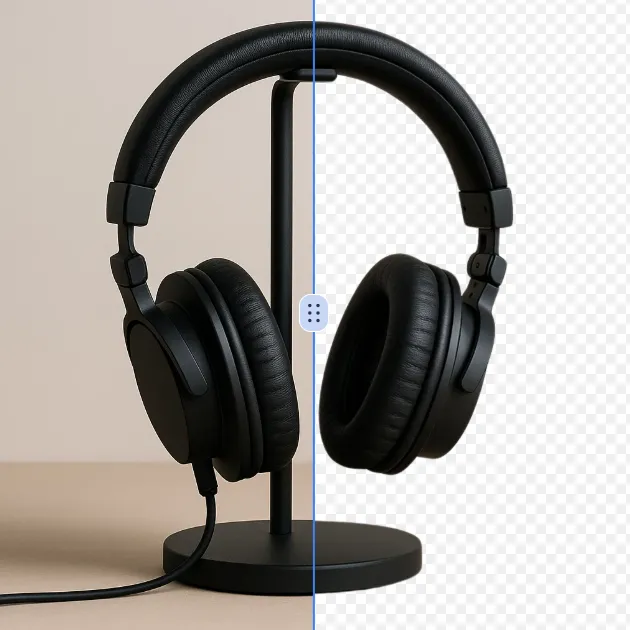
Original Remove White Background From Image image Original
Modified Remove White Background From Image image result Modified
 

What Is Remove White Background From Image?

Remove White Background From Image is a technologically advanced and AI-assisted web tool which automatically removes the white background of your images. This service implements state-of-the-art AI algorithms that are able to find and eliminate solid white backgrounds and at the same time maintain the subject of the image with great accuracy. The tool finds its application in e-commerce product photos, profile photos, design elements, and any other images that require a transparent background.

The application is browser-based, which means that it does not require any significant resources and guarantees data privacy as well as rapid image processing without the need for uploading images to third-party servers. It accepts formats such as JPEG, PNG, and WEBP. The tool can be used by anyone, whether they are photographers, designers, marketers or just occasional users, and the same time will help everyone to create images with transparent backgrounds that look very professional and can be used on different digital platforms.

How To Use Remove White Background From Image

The removal of the white background from the image tool is very easy to use and does not require any technical skills. Simply follow the steps below:

  1. Upload Your Image: Go to the tool page and either click on the area designated for uploading or drag and drop your image. The supported formats are common ones: JPG, PNG, and WEBP.

  2. Let AI Do the Work: As soon as the upload is done, the AI system will instantly examine the picture and accurately get rid of the white background. The browser will do the whole process in real-time without sending your image off to external servers.

  3. Download the Result: After the processing has been done, check the image with the white background removed. You can download the final result in PNG format with a transparent background, which is ready to use directly in your projects.

The whole procedure would not take that long, just a few seconds, so it will be suitable for processing a number of images simultaneously.

FAQs (Frequently Asked Questions)

How does the removing white background from image tool work?

The tool to remove white backgrounds uses specialists' artificial intelligence programs that know all about solid colors' white backgrounds, the most common one. The image is first uploaded and the AI assistant gets down to work analyzing the pixel data to tell the white background apart from the main subject. The next step is creating a detailed mask around the subject and at the same time deleting the entire area of white background. This technology is, in fact, more precise than conventional procedures, such as manual selection or simple color removal, because it understands even the most elaborate parts of an image and is able to deal with the most difficult details, such as hair, transparent objects, and thin edges. No, your images are not sent to any external servers, thus you enjoy total privacy and speed during processing.

What image formats are supported for removing white backgrounds?

The service of removing the white background from an image supports all major image formats like JPEG, PNG, and WEBP files. These formats are the ones that are usually utilized for digital photography and graphics across different platforms. You may upload the images taken with your smartphone, those downloaded from web stores, or even those created with the design software; in each case the tool will accept it. The maximum file size may vary according to browser capabilities; however, typical usage is allowing high-resolution images that are suitable for professional applications. The tool's background removal process preserves the original quality and size of your images.

Can I remove other colored backgrounds besides white?

At present, this special tool is for white backgrounds only. The AI can detect and remove the white background only, as it is specifically trained for that. If you want to remove backgrounds of other colors, you will need to use another specialized tool that can remove any background. Our system focuses on giving the best results for white background removal. Besides white backgrounds, there is a possibility that the tool will produce the best results. For this tool, try to ensure that the subject has a bright white background that is to be removed.

Is my image stored or tracked when I use this background remover?

No, absolutely no tracking of your image happens while using our Service. The background removing service's colocated technology carries out the whole processing right within your browser, which means your images are never transferred to any external servers or left on your device. We do not store, track or gather any information about the images processed with our tool. When you close your tab or switch to another page, no record of your images remains on our side. Therefore, our service is much more private compared to many desktop applications which require account registration or cloud-based tools that upload your files for processing.

How long does it take to remove a white background from an image?

The white background removal process is incredibly quick, taking merely a few seconds for most images. The processing time specifically depends on image size, the complexity of the image, and the power of your device's CPU. Our optimized AI algorithms provide rapid performance even for high-resolution pictures. Since all the processing is done on your computer through the browser, you will get the results instantly without any server delay. This is way faster than traditional photo editing software which could take a long time to install or cloud-based services which depend on internet speed and server availability. For the users who are processing many images at the same time, each image will be processed individually which will keep the performance the same.

What if the white background removal isn't perfect?

In case the first white background removal is not up to the mark, you can choose from different alternatives. Our application provides a text input field where you can write the exact instructions for how you want the image to be treated. For instance, you might point out certain areas that need more work done on them or ask for the edge detection to be changed a bit. The AI understands these directions and therefore the background removal gets refined. Also, the results might not be very good for images that have intricate parts or color gradients that are not pure white. Our system is designed in such a way that it does not keep your images, hence you can try out different techniques by uploading the same image with altered instructions over and over again. For the best outcome, solid white backgrounds are recommended instead of those with lighting variations or shadows.

Start Remove White Background From Image with AI Image Editor Today

Transform your photos in seconds with our powerful AI Image Editor and online image editor tools

Edit Your First Image with ImageFk

More AI Image Editor Tools

Discover our collection of AI-powered Image tools to enhance your creativity

AI Background Remover

AI Background Remover

AI Background Remover is a free online tool that uses advanced AI to remove image backgrounds automatically. It delivers high-quality transparent backgrounds instantly, requires no editing skills, and is ideal for professionals and beginners alike. Save time and enhance your images effortlessly with this powerful, user-friendly solution.

Try Now
AI Cut Out Image

AI Cut Out Image

AI Cut Out Image is an intuitive online tool that automatically removes backgrounds from any image using advanced AI technology. It delivers high-quality transparent PNGs quickly, ideal for enhancing product photos, creating social media content, and design work. Experience effortless editing with no downloads or expertise needed—just upload and get perfect results in seconds.

Try Now
Black and White Photo to Color

Black and White Photo to Color

Black and White Photo to Color is a powerful online tool that uses advanced AI to automatically colorize your black-and-white images. It delivers instant, vibrant, and realistic photo transformations with just a few clicks. Enjoy a safe, mobile-optimized experience that's perfect for reviving old photos or adding creative flair to your projects.

Try Now
Remove White Background From Image

Remove White Background From Image

Effortlessly remove white backgrounds with AI precision. This free online tool delivers fast, accurate edits with secure processing. Enjoy seamless background removal on any device for professional images instantly—no downloads required.

Try Now
Remove Filter from Photo

Remove Filter from Photo

Remove Filter is a free AI-powered tool that easily removes filters from photos to restore their original quality. It quickly eliminates unwanted effects, ensures secure editing with no login required, and delivers fast results. Perfect for enhancing images effortlessly.

Try Now
Remove People from Photos

Remove People from Photos

Our AI Person Remover automatically identifies and deletes people from your images while seamlessly reconstructing the background. Using advanced artificial intelligence, this free online tool preserves photo quality and maintains natural-looking results. Perfect for cleaning up tourist photos, removing photobombers, or creating cleaner compositions without complex editing software.

Try Now
AI Motion Blur

AI Motion Blur

Motion Blur is a free online tool that lets you apply professional motion blur effects to photos. With customizable filters, real-time previews, and high-resolution downloads, it enhances creativity for designers, marketers, and photographers. Achieve dynamic, artistic images effortlessly.

Try Now
Add Shadow to Image

Add Shadow to Image

Transform your images with the Add Shadow to Image tool. This AI-powered solution lets you apply natural drop shadows, customize effects, and elevate designs effortlessly. Enjoy quick, user-friendly editing for standout visuals—free and instant results!

Try Now
×

Unlock Premium AI Image Editing Features

Sign in with Google to access advanced editing tools, save your creations, and enjoy unlimited image enhancements.